Pages

Friday, April 5, 2013

Unless Apple changes its rules, Facebook won’t have a Home on iOS Apple's requirements for third-party apps will keep Facebook in its sandbox.


Facebook on iOS will remain a standalone app, at least for now.
Facebook finally unveiled its long-speculated "Facebook phone" on Thursday in the form of the HTC First, but the phone was actually the least important part of the announcement. More importantly, Facebook revealed an entirely new piece of software called Facebook Home that will be available for an array of popular Android handsets next week: Samsung's Galaxy S III, S 4, and Note II, and HTC's One, One X, and One X+. Support for other Android handsets (and, eventually, tablets) will follow in the coming months.
One of the inquiries at the post-event Q&A session asked an obvious question: will Facebook Home support iOS?
"We do have an active dialogue to do more with them but anything that happens with Apple will happen through partnership with them," said Facebook CEO Mark Zuckerberg at the press conference. "Google is aware of what we're doing, but Android is a more open system so we don't have to work directly with them to build this experience."
In short, Apple's phones won't be getting Facebook Home any time soon. If you're familiar with how each operating system works, this should come as no surprise. But if you aren't, a brief explanation may be in order.

“Open” versus “closed”

The word "open" is thrown around by so many people and in so many contexts that it can basically mean anything you want it to mean. In the case of Android and iOS, the distinction is simple: Android's source code is freely available to those who would like to download and tinker with it, and iOS' is not. Android also allows end users to customize things like their keyboard and app launchers, while Apple opts not to in the name of simplicity and consistency.
iOS does allow you to download and run any software you want from Apple's App Store, but even those apps come with restrictions (some obvious and some less so). Third-party apps aren't allowed to communicate directly with one another, for example (you can't use the Facebook app to post a photo stored in Dropbox), and apps can generally only interact with third-party services that Apple explicitly supports (you can post a photo from the Photos app to Twitter or Facebook, but not to Google+).
Finally, third-party apps aren't given the same level of access to the OS as first-party apps: mobile Safari can use Apple's beefed-up Nitro Javascript engine, but Google's Chrome for iOS can't access itor use its own rendering engine (a slower, Nitro-less version of the browser engine is used in it and all third-party apps that load webpages).
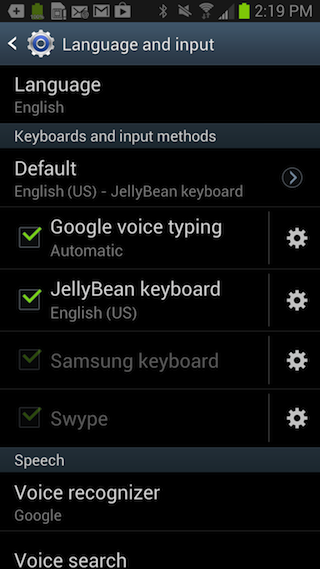
Want to change the way your phone looks and acts? You're going to need Android.
Android, on the other hand, lets third parties modify the user experience pretty much however they want—Google has loose requirements for phones that provide access to the Google Play store and the Google Android apps, but otherwise anything goes. Android browsers can use their own rendering engines. The Gallery app can upload photos through any app that tells the Gallery app that it is capable of uploading files (a system called "intents"). Phone makers, carriers, and users can all install basically any application launcher, keyboard, or app that they want.
This is the "open"-ness that Facebook is taking advantage of in order to make Facebook Home work. Home itself is essentially an application launcher that changes the way your phone looks and acts without actually modifying the core Android OS, which will also allow Facebook to keep Home updated without having to clear the updates with a carrier first. Because of how Home works, basically any Android phone can become a Facebook phone as long as it's supported, and the company doesn't have to worry about the fragmentation headaches, vastly different UIs between phones from different manufacturers, and other inconsistencies that plague the platform.
Because of all of this, Home in its current incarnation can't move away from Android to most other platforms, either. Both Windows Phone 8 and BlackBerry 10 have the interfaces and app launchers that they have, and there aren't any mechanisms by which a third-party application could dig its hooks in as deeply as Home does on Android. Without coding a completely separate operating system, then, Android is the only platform that can support Home at all.

Never say never?

Android exclusivity doesn't necessarily doom Facebook Home to failure—Android's worldwide smartphone market share exceeds that of its competition, so the number of potential users out there is high regardless of whether Home comes to iOS or any other platform. It just means that Home as it was shown off today is not a thing that can exist on iOS in the same way that it can exist on Android.
None of that is to say that Home can't evolve or change for iOS, though. Zuckerberg did say that Facebook's relationship with Apple was good, and Apple doesn't have a dog in the social networking fight the way Google does with Google+. The third-party Facebook app for iOS could pick up some of Home's easier-to-port features, and Apple could deepen the native Facebook integration in future versions of iOS (the current level of integration was just introduced in iOS 6, so it could be the first step in a longer journey).
However, Home in its current form simply can't come to iOS (or Windows Phone, or BlackBerry 10) unless Apple drastically changes how it deals with third-party applications. But given that Apple has been bringing many of its existing rules over to its historically more-flexible desktop OS in recent releases (instead of the other way around), we wouldn't count on that happening any time soon.

Samsung Galaxy Note 8.0 to hit stores on April 13, free phones to early buyers


amsung recently launched their Galaxy Note 8.0, a portable phone/tablet for people who want an all-in-one device with ample screen size to really get productive with the included S-Pen.
Samsung Galaxy Note 8.0
The Samsung Galaxy Note 8.0 takes the telephony features of the Galaxy Note 2 and the tablet features of the Galaxy Note 10.1, and puts it in a portable 8-inch device. It packs a 1.6GHz quad-core processor with 2GB RAM and comes with 16GB internal storage with a microSD option. It runs on Android Jelly Bean and has a 5-megapixel camera at the back plus a 1.3-megapixel lens in front.
Popular multi-media personality Bianca Gonzales is Samsung Galaxy Note 8's brand ambassador
Popular multi-media personality Bianca Gonzales is Samsung Galaxy Note 8′s brand ambassador
Now this device will officially be available in Samsung stores on April 13 with an SRP of Php23,990.
As a treat to early buyers, there’s a special first-day selling event at the SM Mall of Asia Atrium. Those who will line up from 10AM to 12NN to purchase a Galaxy Note 8.0 will get to pick a prize from Samsung. Up for grabs are the Samsung Galaxy S III, Galaxy Note 2, Galaxy S III Mini, Galaxy Grand, Galaxy S Duos, Galaxy Y Reloaded, and the E1200.
Each buyer of the Samsung Galaxy Note 8.0 on that day are also entitled to a free Samsung book cover worth Php1,699.
Sun Cellular will also be bundling a WiFi version of the Galaxy Note 8.0 with the Galaxy S III mini on their Plan 1699 soon after the release date.
Samsung Galaxy Note 8.0 Specs:
8.0-inch capacitive touchscreen (1280 x 800), 189 ppi
1.6GHz quad-core Samsung Exynos 4412
Mali-400MP GPU
2GB RAM, 32GB internal storage, microSD up to 32GB
Android 4.1.2 Jelly Bean with TouchWiz UX
5-megapixel rear camera (no flash)
1.3-megapixel front camera
S-Pen
Bluetooth 4.0
GPS with A-GPS, GLONASS
HSDPA, 21 Mbps; HSUPA, 5.76 Mbps
Li-Ion 4600 mAh battery
210.8 X 135.9 x 7.9mm
338g
SRP: Phpo23,990

Thursday, April 4, 2013

NVIDIA improves notebook GPUs with GeForce 700M series


NVIDIA recently announced five new notebook GPUs that come with new technologies to enhance performance and enrich gaming visual experience.
NVIDIA GeForce 700M
We already know about the NVIDIA Optimus technology which prolongs a notebook’s life by automatically switching off the GPU when the system doesn’t need it.
The NVIDIA GeForce 700M series will also come with the NVIDIA GPU Boost 2.0 technology, a feature commonly found in premium NVIDIA desktop GPU cards. This technology intelligently adjust the GPU clock speed to when needed to maximize graphics performance.
Finally, this series come with the GeForce Experience software to optimize in-game settings for the best performance depending on your system so you don’t have to bother manually setting it yourself.
The new lineup of NVIDIA GeForce 700M GPUs include the GeForce GT 750M, GeForce GT 745M, and GeForce GT 740M GPUs for the performance segment, as a well as GeForce GT 735M and GeForce GT 720M GPUs for the mainstream segment.
If you like to game on your laptop, you should aim for those having these new notebook GPUs.

5 smartphone features that are overrated


It seems that every week there’s a new smartphone announced or launched and most of the time, it’s almost the same as that of ones that are announced earlier. Just a little bit different spec-wise.
When looking for a new smartphone, what’s that certain uncommon feature that matters to you? Before you say that a smartphone sucks because it lacks a certain feature, do you ask yourself if it’s something that you really want or need?
Here are 5 features of smartphones that I think people (not all) should not be concerned about when a phone doesn’t have it.

NFC

Near Field Communication or NFC is the evolution of Bluetooth pairing. Instead of setting up BT on devices for pairing, NFC just require you to bump your devices together to communicate. Sounds cool right? On paper yes, and if you have a lot of NFC devices.
However, just like Bluetooth, there’s the initial “setup” required to authenticate a device for future NFC pairing say for example an NFC speaker. So in that regard, it’s still the same as Bluetooth. Once paired, it will automatically pair the next time around if it sees it. Not that hot anymore huh?
Xperia SmartTags
I guess at this moment, the practical application would be those NFC tags where you can set rules for your phone to follow once bumped. I’m sure there are far more better applications for NFC in the future but right now (and maybe next year), it’s just a nice-to-have phone feature.

microSD slot

When a phone doesn’t come with a microSD slot, I always see a lot of people cringe. It’s funny because I doubt if most of these people really need more than 16GB (they stopped producing non-microSD slot phones with only 8GB storage me thinks) worth of storage space.
microSD
Of course, there are media hogs out there who don’t have time to delete games they don’t play, or videos they won’t watch anymore. To those types of people, maybe an extra 32GB might eventually not be enough as well.

LTE

LTE or Long Term Evolution gives users access to mobile high-speed internet. Now who wouldn’t want that? Well, unless you’re going to be using your phone as a tether to download torrents, I don’t see why a high-speed Internet is of use for the average smartphone user.
LTE
Yeah it looks cool to share your LTE speed test results on Facebook but it does get old, trust me. 3G should be fine (even for Skyping) and its less power hungry. Don’t pass a good phone just because it doesn’t have LTE.

Waterproof

So you want a phone that you can take with you while you shower? Ok. Whatever floats your boat. But do you know how phones get waterproofed? They use rubber flaps to cover exposed ports such as the microUSB. And you know what happens if you keep on opening and closing these flaps whenever you want to charge your phone? They eventually get loose (quickly I should say) so there goes your waterproofing.
xperia v with loose flap
If you really want to waterproof your phone, get a well-built waterproof case for it instead.

Full HD screen

Ooh check it, my phone has Full HD. Awesome right? Well, not really. A 1080p movie is about 6GB so how many movies can you put there to enjoy your Full HD screen? Or how often do you download Full HD videos?
HTCButterflyfront.jpg
Unless you always connect your mobile device to your big screen, you really don’t need a Full HD resolution. If you’re watching a lot of Full HD videos, I always suggest doing it on a 40” and above screen. On a 5-inch phone, you really won’t notice much difference if the screen is Full HD or just HD so don’t get a phone just because it has a Full HD resolution.

Conclusion

There are many smartphones right now, some with dazzling built-in features, but if you’re looking for one, the deciding factors should still be the basics: price, platform, design, brand and then your intangibles in any order of preference according to your primary usage.

Wednesday, April 3, 2013

Divoom iFit-3 Speaker Dock Review


We’ve covered a handful of Divoom speakers in this site already and here’s another one, the Divoom iFit-3 speaker dock made for the iPod, iPhone, and even the iPad.
Divoom iFit-3 1
The Divoom iFit-3 seems to have been carved out of a bowling ball. It’s a speaker meant as a companion for tablets, as it is designed with a mount at the front.
Divoom iFit-3 2 Divoom iFit-3 3
A hole at the bottom of the mount allows you to route the headphone jack from under the unit, with the rubber pads providing enough clearance to fit the cable, but you can easily  route it around when you use a tablet. The included audio cable is long enough. The ports and switch are found at the back of the unit, just like its other siblings.
Divoom iFit-3 4
As a speaker, it gets muddy or distorted when you crank up the volume too high or when you play really fat beats, but I find that it renders voices quite well, so you’ll be able to understand the lyrics to the songs that you’d listen to or the dialogues whenever you watch your favorite TV series (Fringe!).
I found a little quirk though, or maybe it’s isolated to this unit. When using it on my iPad, I can barely hear anything at the middle volume setting, you have to slide the volume way up to hear better.
Divoom iFit-3 5
It having an internal battery hints that it’s portable, but the size, shape and weight doesn’t necessarily make it so. It has pointed corners, especially at the back that you would not want to drop this thing on your foot or have your kid handle it. It is a perfect weapon for domestic disputes I might say. Imagine you’re male and married, getting home really drunk from a party, seeing your angry wife about to throw this at you. It’ll make you sober.
Despite the interesting shape, It does serve its purpose adequately as a good speaker and mount for a tablet. It’s mass makes for a really stable base and I find myself using this often with my iPad at home to watch videos. It’s battery is rated at 8 hours which during my time with is spot on.
Retail price for the Divoom iFit-3 is Php1,800 and should be available in your favorite authorized Apple reseller store.

ASUS Zen Drive, more than just your ordinary external DVD writer


Notebooks without optical drives are getting more popular these days now that the Ultrabook form factor is also being used in mainstream notebooks. People simply opt to go with an external DVD drive especially if they don’t need it often.
ASUS-Zen-Drive
The ASUS SDRW-08D3S-U Zen Drive is an external DVD writer that is figuring out to be a cut from the rest. From the stylish design alone, it’s not your typical plain-looking slim external writer. It has that metallic-spun (although polycarbonate) body inspired from their premium Zenbook line of notebook.
It’s only 20mm thin and weighs just 365g. It is also USB-powered so you don’t have to lug along a power brick just to use it. Now that’s portable.
What’s cool with the ASUS Zen Drive is that it comes with an AV function. What this does it that it allows multimedia files stored in your CD/DVD to be read by TVs and tablets that can read files off USB devices. Like an external hard drive connected to your TVs USB but with files burned on CDs or DVDs instead.
This external DVD drive also has a built-in 256-bit encryption if you want to keep your burned CDs/DVDs secured. It supports password-controlled access and hidden-folder masking for complete privacy of information. 
No news on local pricing and availability yet for this device but we’ll keep you posted once we have it.

Tuesday, April 2, 2013

Internet Explorer 10 almost doubles its users thanks to Windows 7 release Proving once more that automatic upgrades are effective.


There were no big changes in the browser landscape in March. The top three held their positions, and Windows 8 continues to grow at a sluggish pace. The biggest change? Internet Explorer 10 almost doubled its market share, thanks to the late February release of its Windows 7 version.
On the desktop, Internet Explorer saw no meaningful change, at 55.83 percent for the month compared to 55.82 last month. Firefox and Chrome both edged up a little, gaining 0.09 and 0.18 points for shares of 20.21 and 16.45 percent respectively. Safari and Opera both nudged downward, losing 0.11 and 0.08 points to drop to 5.31 and 1.74 percent respectively.
In the mobile space, Safari bounced back, up 6.38 points to 61.79 percent. After a surprising high last month, Opera Mini fell 4.32 points to 8.4 percent. Symbian likewise dropped from an unusual high, losing about two thirds of its February usage. It fell 0.83 points to 0.54 percent. Android Browser was down, losing 0.96 points for a share of 21.86 percent.
Mobile Internet Explorer posted its eighth straight gain, adding 0.41 points for a 1.99 percent share.
It's the version breakdown that shows the biggest March changes. Chrome and Firefox's graphs show a familiar story: rapid uptake of the current version for most users, but a small tail of users who are stuck on the older versions.
Firefox still appears to be suffering attritional losses with each update, with a greater proportion of users getting stuck on old versions.
It also seems that the effort to create Extended Support Releases—relatively long-lived versions that receive security updates without concomitant feature updates—has been more or less wasted, with neither ESR version (10 or 17) showing any significant level of usage. There are more users of Firefox 16 and as many users of Firefox 14—both obsolete, unsupported, and no longer receiving security fixes—than there are of Firefox 17.
For Internet Explorer, we see the first fruits of a new Microsoft policy. When Redmond shipped Internet Explorer 10 for Windows 7, it for the first time made the browser an automatic update that will install automatically on systems using the default Windows settings. (Internet Explorer 9 did get shipped as an automatic update, but only some months after the original release.)
One month on, it looks like this is immediately having an impact. After five months on the market as a Windows 8-only browser, Internet Explorer 10 had taken a 1.6 percent market share. After one month of availability on Windows 7 as an automatic update, that's grown to 2.95 percent. The automatic update is currently being enabled on a market-by-market basis. As the switch is thrown in more markets, we can only expect this to grow.

Meet Nvidia’s GeForce 700M GPUs, same as the GeForce 600M GPUs Last year's architecture + clock speed bumps = whole new product line.


Nvidia's GPU Boost 2.0 is one of the few new things the GeForce 700M chips offer over their predecessors.
Yesterday, Nvidia announced a new line of laptop GPUs for 2013, the GeForce 700M series. Don't get too excited, though—these GPUs are identical to their 600M series predecessors in most ways. As CEO Jen-Hsun Huang said in his keynote at the 2013 GPU Technology Conference, the company is sticking with its current "Kepler" architecture until 2014, so these chips use the same architecture as last year's models. They also use the same 28nm process and GDDR5 (or DDR3) memory as the 600M series. So what's the difference?
The answer is "not a whole lot," though there are some tidbits here and there. AnandTech has done acharacteristically thorough job of wrangling the specifications of the chips, showing a group of chips with marginally higher clock speeds than their predecessors—the GeForce GT 745M, for example, has a GPU clock speed of "up to" 837MHz and memory clock speed of "up to" 5GHz, compared to 710MHz and 4GHz for the GeForce GT 645M. These increases should be good for gains of about "15-25 percent relative to the previous models," provided that PC makers don't lower these clock speeds too much to save power. This is a respectable boost over current chips given that the architecture and manufacturing processes are both the same, but not enough to warrant upgrading that laptop you bought a couple of months ago.
The specific GPUs being announced are all aimed at mainstream laptops rather than high-end gaming laptops; the GeForce GT 750M, 745M, and 740M GPUs cover the middle end of the market, while the GeForce GT 735M and 720M are aimed at lower-end laptops that want something slightly better performing than Intel's integrated graphics. High-end gaming laptops will continue to be served by "last-generation" products like the GeForce GTX 675MX and 680MX, though since these chips are still based on the Kepler architecture, new buyers won't be missing out on much.
A few other, smaller innovations are also on the table: the 700M series supports GPU Boost 2.0, a tweaked version of the technology that allows GeForce GPUs to exceed their stated clock speed as long as there's enough power to do it and the chips aren't running too hot (similar in concept to Intel's Turbo Boost feature on the CPU side). Version 2.0's main innovation is that it can adjust speeds based on the temperature of the GPU and the surrounding system; version 1.0 made its decisions based only on power usage.
Nvidia says that games can get a 10-15 percent bump through GPU Boost 2.0, but that figure depends on the laptop in question. Even with integrated graphics, laptops can get quite hot while gaming, and I wouldn't expect there to be a whole lot of thermal headroom available for big, sustained clock speed boosts. This feature makes more sense in a desktop with ample airflow and cooling, and indeed GPU Boost 2.0 was originally introduced in Nvidia's ultra high-end Titan graphics card.
Other advertised features are already supported by current 600-series GPUs, including Nvidia's Optimus technology (which seamlessly switches between the dedicated Nvidia chip and integrated Intel chip to save power) and the "GeForce Experience" software that tries to automatically enable the best graphics settings in a given game that will run smoothly on a given GPU.
Rebranding GPUs is by no means a new phenomenon, and Nvidia is by no means the only company doing it. OEMs in particular like their new products to look like upgrades in every way from last year's models, and bumping the model number of a GPU (regardless of the underlying architecture) is one of the easiest ways to do this. As TSMC's 28nm process grows more reliable and more mature, increasing clock speeds beyond what was possible earlier in the process' lifespan is also an easy way to pass the benefits of that maturity on to the customer. Buyers should simply be aware that these "new" 700-series chips don't present much by way of increased performance or decreased power consumption over last year's 600-series chips. If you're waiting for something truly new, both Nvidia and AMD are due to release all-new GPU architectures next year.

PLDT Fibr expands reach to over 300 residential areas in the country


PLDT is aggressively expanding the reach of its fiber-to-the-home (FTTH) network to over 300 residential subdivisions in the country.
PLDT-FibrUnder PLDT Fibr, home subscribers can enjoy up to 100Mbps broadband speed which you can use not only for data but also for voice calls. Apart from these service, customers can also enjoy streaming blockbuster flicks via Clickplay.
The new FTTH areas include: Sta. Rosa Estate Phases 1 & 2 in Laguna; Southvale 1&2 and Palms Pointe in Muntinlupa; Manila Southwoods in Cavite; and White Plains and Tierra Pura in Quezon City. In Visayas and Mindanao, Fibr is now accessible in Cebu Royale Estate, Beverly Hills Subdivision, Pristina North, Bayswater Subdivision, Happy Homes, Ajoya Residences, Deca Baywalk, and Reldo Subdivision in Davao.
Accessible in various plans, Fibr is available in Plan 3500 with speed of up to 8Mbps; Plan 5800, up to 20Mbps; Plan 8800, up to 50Mbps; and Plan 20000, up to 100Mbps. These plans include free installation, free Fibr modem, and free PLDT WiFi Zone access with PLDT Telpad subscription. You can essentially replace your phone/DSL subscription with PLDT Fibr as this service also includes Fibr Voice line.
PLDT’s extensive 54,000 kilometers of fiber optic cables facilitate the efficiency of the company’s digital services such as Fibr, myDSL, and Telpad.

Smart extends unlimited LTE service to June 30


If you’ve been wondering what will happen after Smart’s unlimited LTE ends (previously April 30), whether it will shift down to 3G if the cap is consumed or you really had to pay for additional bandwidth, well we won’t know yet because Smart just extended their unlimited LTE to June 30, 2013.
Downloading-with-Smart-LTE
This is good news for Smart LTE users as they can experience speeds of up to 42Mbps without capping for a while longer. And there’s still a lot of time for new LTE subscribers to enjoy the speed.
In line with this, Smart also introduced a couple of affordable LTE-enabled Android smartphones, theZTE T82 and Huawei Ascend D1 which are now available for free or for a one-time cash-out of P4,500, respectively, with a Smart All-In Plan 800.
With an All-In Plan, you can subscribe to Always On or Unlisurf packages to enjoy Smart’s wide LTE coverage. To see the full list of All-In services, visit www.smart.com.ph/postpaid.
Other LTE-enabled devices available in the online store are the Apple iPhone 5, free on Smart iPhone Plan 2499 with unlimited LTE access until June 30, 2013, the Sony Xperia V which is free at All-In Plan 1200, and the Smart LTE Pocket WiFi device which can be purchased for a one-time fee of P2,000 with an LTE Broadband Plan 1299, 1749, or 3500.